Save time assigning reviewers to appraisals, by assigning default appraisal reviewers by branch. This article covers how you can do this from within the branch management section of Flow Learning.
Start from: the Flow Learning dashboard.
- Select Company > Company Structure from the main menu.
- Head to the Branches tile.
Note: The Branch section only appears if the platform has departments enabled.
- Choose a branch from the list.
- To assign the default reviewer, scroll down to the Appraisal Default Reviewer field.
- Select a Name from the dropdown list.
- Hit Save to return to the list of branches.
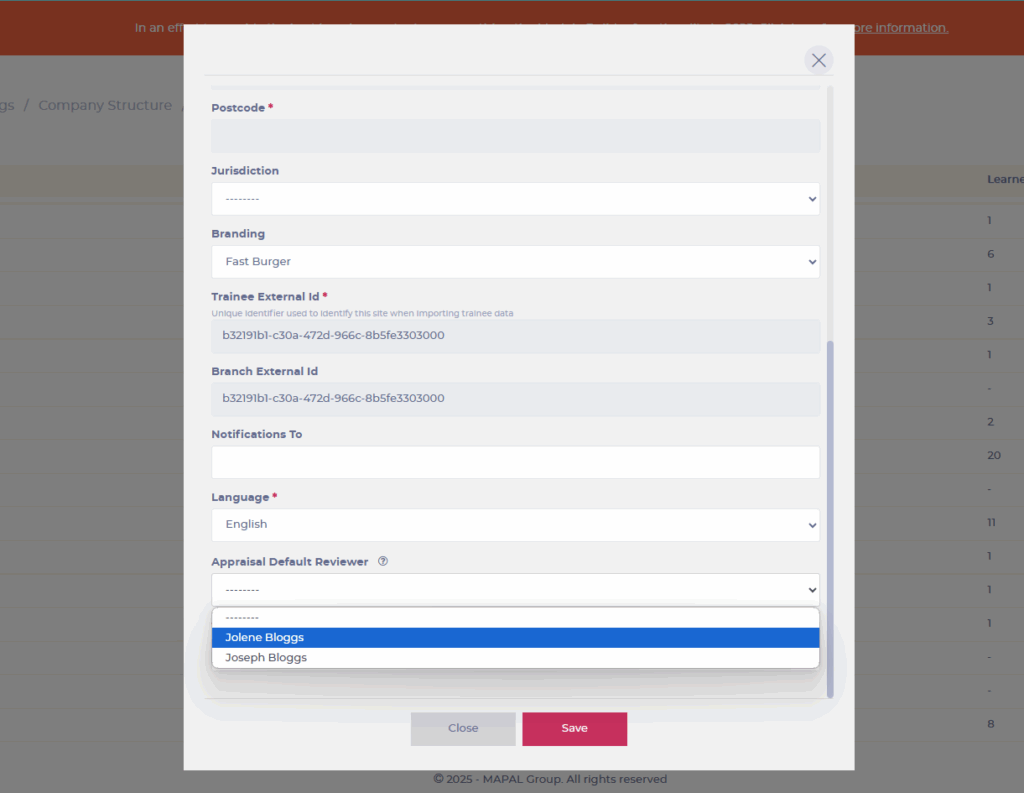
Note: When a default reviewer has been set up, their name will be displayed as the reviewer when an appraisal is assigned to a learner.
To learn how to assign default reviewers through L&D Settings, see Set up appraisal reviewers by branch and department.
Originally published at https://help.mapal-os.com/flow-learning/learning-and-development/appraisals-and-action-plans/assign-default-reviewers-by-branch/
0
0
Was this article helpful?
0 out of 0 found this helpful
Add comment
Please sign in to leave a comment.