Flow Learning allows learning managers to use Smart Analysis to gain valuable insights into learner performance, helping them make faster, more informed decisions compared to manual reporting.
Notes: Smart Analysis is a tool, not a final decision-maker. Always verify key results using the data visible in your system. AI may occasionally provide incomplete or incorrect responses. If in doubt, cross-check with learner records or reports. Start from: The Flow Learning dashboard.
Smart Analysis for Learning and Development
- Navigate to Company > Learners.
- Select a specific Learner from the list.
- Select the Smart Analysis button located on the profile.
- A chat window will appear — this is your AI assistant.
- Type a question to request a summary or specific insight about the learner’s progress.
- The chatbot will respond based on real-time data in your system, and may also offer suggestions for improvement.
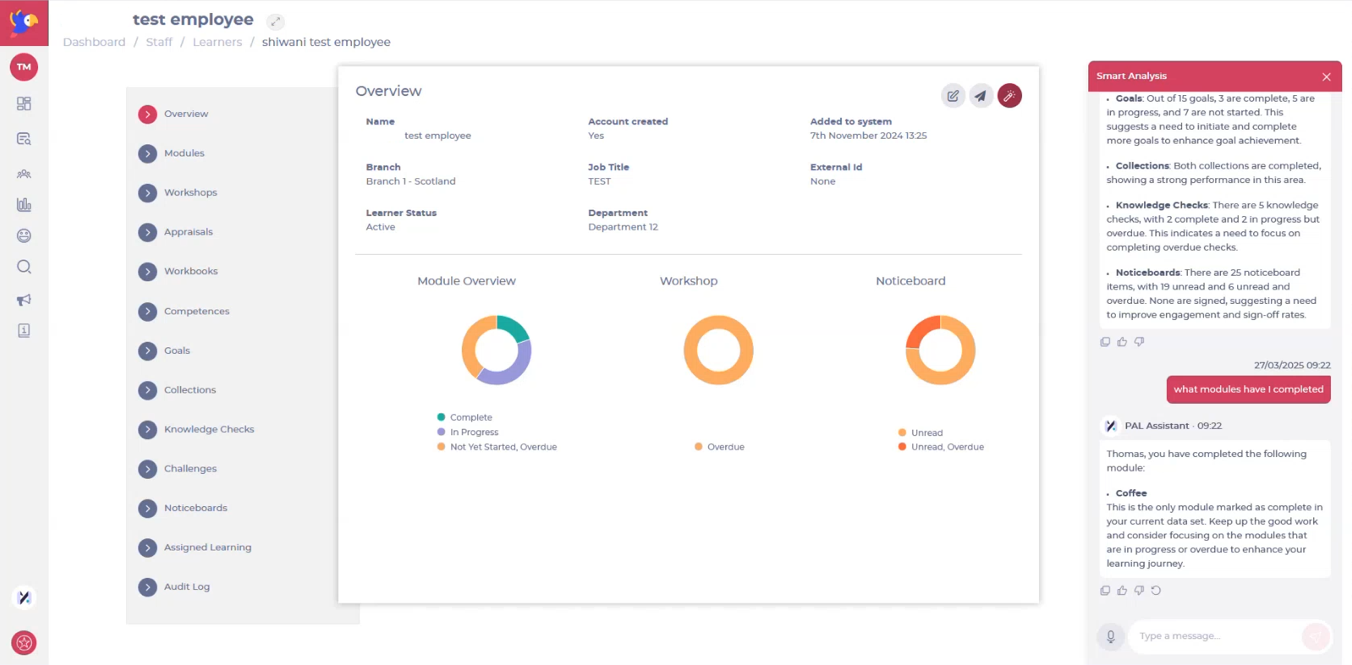 Suggested prompts
- "Give me an overview of how this learner is performing"
- "What modules have they completed?"
- "Do they have any appraisals due soon?"
- "Has this learner been reading their noticeboards?"
- "How are they doing at the moment with goals?"
Smart Analysis for reports
- Navigate to Reports.
- Open any of the following reports:
- Learner Progress
- Compliance
- Branch Scorecard
- Workbook Summary
-
Select the Smart Analysis button.
-
Ask questions related to the overall data, trends, or specific breakdowns.
Suggested prompts
- “Which teams have the lowest compliance this month?”
- “Are there learners overdue on their mandatory training?”
- “Give me a summary of progress by branch.”
- “Which workbooks have the highest completion rates?”
Originally published at https://help.mapal-os.com/flow-learning/company/learners/smart-analysis-for-learning-and-development/
0
0
Was this article helpful?
0 out of 0 found this helpful
Articles in this section
- Edit training dates for a learner
- Review and reply to appraisals (as a manager)
- Assign individual appraisals (through a learner profile)
- Remove individual learners from the system
- Edit individual learners' information
- Add individual learners to the system
- Mark an External Training record as complete
- Merge learners
- Add and edit job titles
- Unlink a learner (user verification)
Add comment
Please sign in to leave a comment.